


Inventory software by CIPAM
Inventario, inventory software for barcode and RFID terminals
Do your inventory counts take days and your system stock never matches what is actually on the shelves?
Inventario replaces paper lists and re-keying into Excel. With a barcode or RFID terminal, your teams count faster and see discrepancies while they count. You end up with physical stock reconciled with your system stock.
Today
Paper and Excel
- Printed lists, counting by hand
- Count sheets re-keyed into Excel
- Discrepancies found afterwards, when it is too late to recount
With Inventario
Barcode
up to5×
faster than a paper-based count
- One scan per item, no copying errors
- No re-keying, direct export to your ERP
With Inventario
RFID
up to-95%
inventory time
- Dozens of tags read in one second, without aiming
- Items read inside boxes and on high racks
- Missing items located with the terminal
Making the Right Choice
Inventory software or stock management software?
Inventory management software tracks inventory movements in real time. Inventory software verifies that the inventory actually exists by counting it on-site. Inventario performs this count and sends the results to your ERP system, which then updates the inventory levels.
What Inventario Does
- Prepare the list to be counted, by site and by zone
- Checkout using the terminal, barcode, or RFID
- Compare each reading to the expected amount
- Requires that each discrepancy be classified with a reason
- Export the results to Excel or CSV
What Your ERP Stores
- Admissions, Discharges, and Transfers
- Orders and Replenishment
- Inventory Valuation
- Adjusting inventory levels after the inventory count, using the “Inventario” file
Use Cases
What types of inventory counts can you perform with Inventario?
Any situation where items are tracked using barcodes or RFID tags, whether in a warehouse or in an office.
Annual Inventory
The year-end inventory required by your accountant. Multiple teams conduct inventory counts simultaneously, and the results are consolidated as soon as the counts are complete, without the need for re-entry.
Cycle Count
One zone at a time, every week or every month, without stopping operations. The history shows the zones where discrepancies recur.
Equipment and Tools
Tools, equipment, rental items, IT assets: knowing what’s available and at which location.
Fixed Assets and Furniture
Reconcile the fixed assets ledger with what is actually on the premises, office by office, before an audit or a move.
Two versions
Standalone application or with a web interface: Which version of Inventario should you choose?
Use the app on its own for a one-time inventory on a few devices. Add the web management interface as soon as you start conducting frequent inventories, involving multiple operators, or across multiple locations.
Inventario App Only
Annual inventory, one-time campaign, small fleet
- List of items imported to the terminal (CSV file)
- Results exported as a CSV file from the terminal
- Device-based license, without an account or server
- No internet connection required
Starting at €35 (excluding tax ) per month per terminal
Annual License
The most comprehensive
Inventario App + Web Interface
Cycle counts, multiple teams, multiple sites
- Web-based management interface, no installation required: all you need is a browser
- Inventories created in your browser and sent to the terminals
- Results compiled in the web interface, Excel export
- Operator, Site Manager, and Group Manager Accounts
- Multi-site, reasons for discrepancies, history
Starting at €59 ( excluding tax ) per month per terminal
Compare the two versions in detail
| App only | App + web interface | |
|---|---|---|
| Preparing the list | CSV file imported to the terminal | In the web interface, from your browser, automatically sent to the terminals |
| Results | CSV Export from the Terminal | Compiled in the web interface, Excel export |
| Users | Device-bound license, no account required | Accounts and roles: operator, site manager, group manager, administrator |
| Multi-site | No | Yes: sites, zones, and permissions per site |
| Internet connection | Never necessary | To synchronize. Counting continues offline, and the data is sent once the network connection is restored. |
| Terminal Rental | Inventory included in the rental price, available as a standalone application or with a web interface | |
How It Works
Taking Inventory with Inventario: Step by Step
The counting process on the terminal is the same in both versions. What differs is how the list is prepared and how the results are reported.
App + Web Interface
The process using the web-based management interface
1. Preparethe repository
Import your items from the provided Excel template (items, categories, zones) or create them one by one. Each item is either a single unit or a package: a box of 500 screws has a single code, and the operator adjusts the quantity on the terminal.
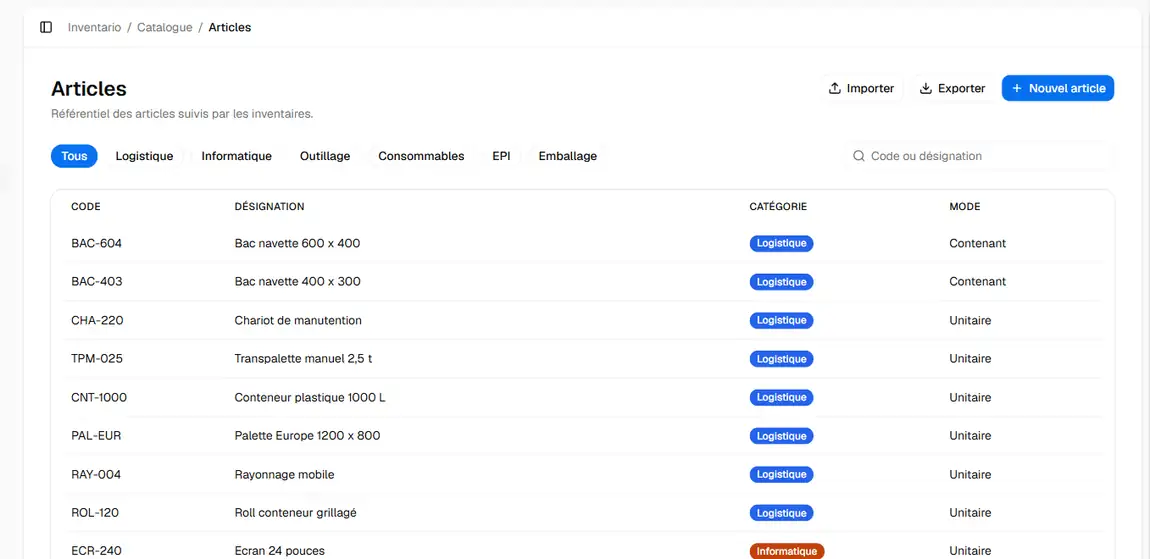
2OrganizeSites and Zones
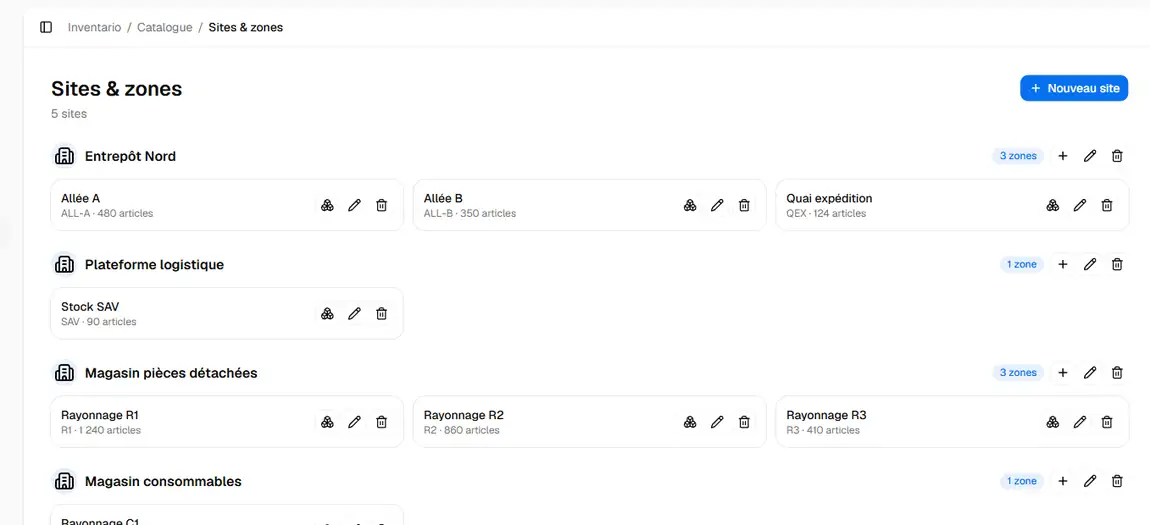
Each site is divided into zones: aisles, loading docks, shelving areas, and warehouses. An inventory is started in one zone and carried over to the next without having to create a new list.
3Countingon the terminal
The operator opens the inventory assigned to him or her. When using RFID, the operator presses the trigger and reads dozens of tags at once, without aiming. When using barcodes, the operator scans 1D and 2D codes one by one. The operator switches between modes when a shelf contains a mix of both.
The display shows the actual count versus the expected count for each item. If an item is missing, the “Locate” button guides the operator: a progress bar fills up and the beeps speed up as the operator gets closer.
When the process is nearly complete, the app flags any items that are still missing. The operator either goes back to retrieve them or confirms the order with full knowledge of the situation.
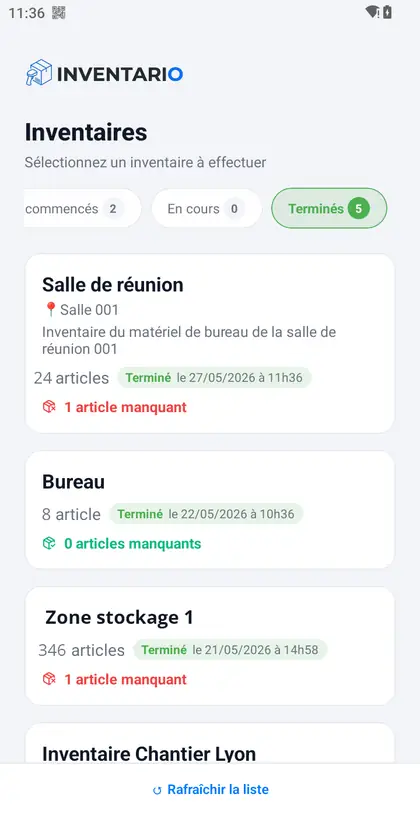
Assigned inventories
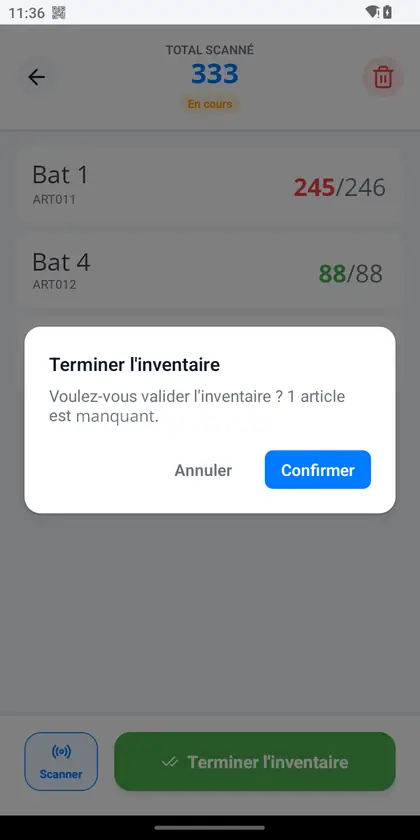
The warning before finishing
4. Classifythe discrepancies
Before closing out the shift, the operator reviews any missing or excess items. The operator selects a reason from a list that you configure: suspected theft, breakage, initial data entry error, or unrecorded transfer. The supervisor reads the reason at the same time as the discrepancy.
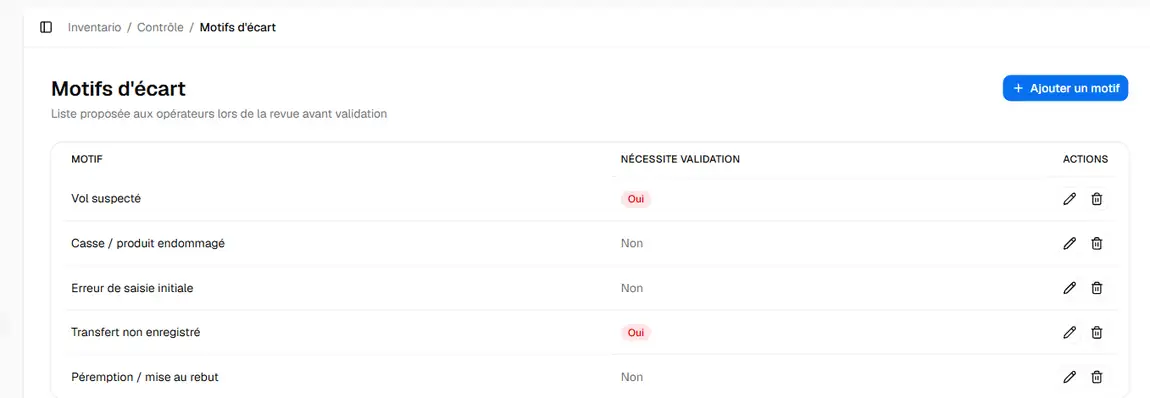
5. Analyzeand Export
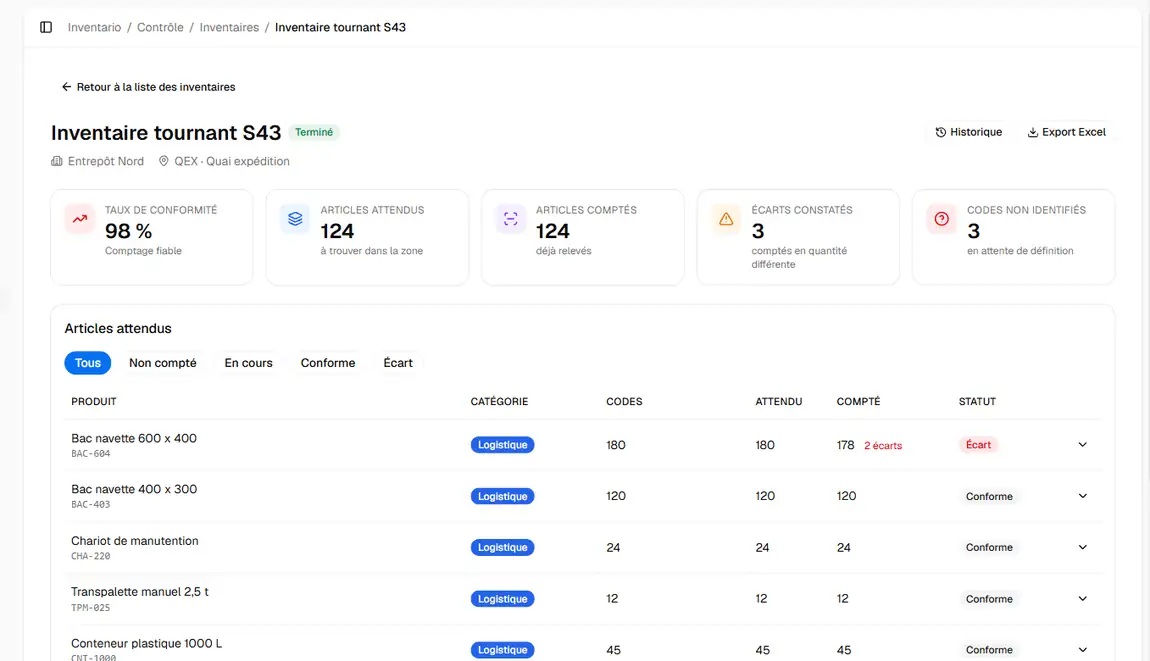
The web interface displays the compliance rate, item-level details, and codes that were scanned but are unknown to your product database. You can filter by status, view the history, and export the results to Excel for your ERP system, accounting department, or auditor.
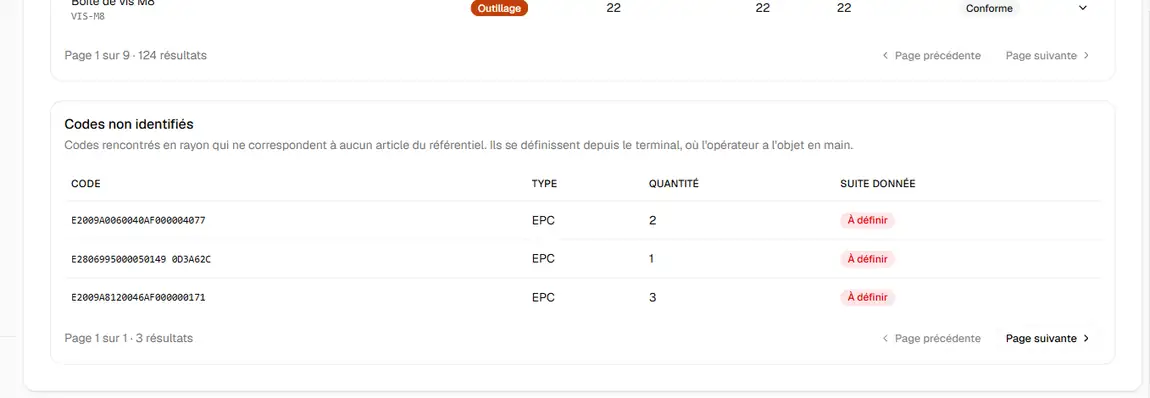
App only
The experience using just the app
1
Load the list
Export the list to be counted from your ERP or Excel in CSV format, then copy the file to the terminal.
2
Count
The same inventory screen as in the web interface: bulk RFID reading or barcode scanning, showing the actual count against the expected count for each item.
3
Finish
The app flags missing items before confirmation. The operator either locates them or confirms them.
4
Export
The result is saved as a CSV file on the terminal. You can open it in Excel or import it into your ERP system.
Results
What does Inventario tell you at the end of an inventory?
For each item: whether it’s there and what to do if it isn’t. An item missing from its designated area isn’t necessarily lost—it may be stored elsewhere. That’s why Inventario distinguishes between five statuses instead of two.
To learn more about the causes of discrepancies: reducing inventory discrepancies.
In the field
The Features That Make a Difference
Inventario accounts for situations that would otherwise prevent a standard inventory from being completed.
Fleet already tagged
Your equipment has RFID tags, but no one has linked them to SKUs. The operator makes the connection on the spot, one way or the other. An unknown code becomes a new item without leaving the inventory.
Multiple sites, fees per site
The web interface mirrors your company’s organizational structure. A site manager can only view their own site. The group manager has an overview.
Articles containing
A single code for a box of screws or a batch of cables: the operator adjusts the quantity using the + and – buttons, without switching screens.
Areas with no network coverage
Basements, cold storage rooms, steel buildings: the terminal stores the readings and sends them back over the network.
Adjustable reading range
Reduce the RFID range so it doesn’t read the adjacent aisle; increase it for a tall rack.
RFID Seal Verification
When used with compatible tamper-evident labels, Inventario displays the status of each seal upon scanning: sealed, opened, or tampered with. This option is enabled only for the relevant inventories.
Switch to barcodes or RFID
Starting from scratch? CIPAM has you covered from start to finish
Inventory software is useless if the items aren’t identified. CIPAM provides everything you need with Inventario and tailors it to your workflow.
Tags
Barcode labels and RFID labels designed for your materials: cardboard, plastic, metal, and outdoor use.
Printers
Label printers for printing your barcodes and encoding your RFID labels on-site when an item arrives.
Terminals and Readers
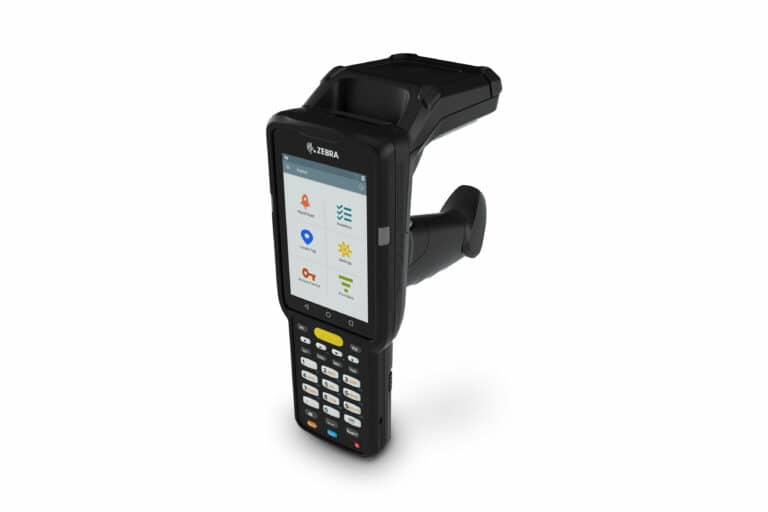
Zebra Android terminals, from the TC22 barcode scanner to the MC33R RFID handheld scanner, available for purchase or rental with Inventario included.
Business Process
What to label and how, zone division, counting rules, and operator training. We’ll start with your current inventory.
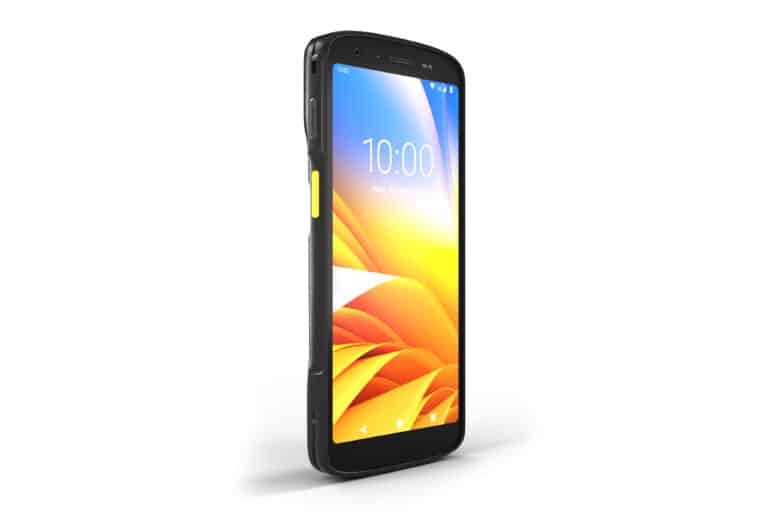
Do you already have Android devices? We’ll check their compatibility before you commit.
How much does Inventario cost?
Starting at €35 (excluding tax) per month per terminal for the app alone, and starting at €59 (excluding tax) with the web management interface. The price decreases as the number of terminals increases.
Inventario App Only
- Annual license tied to the device
- Import the list and export the results to CSV
- Works without an internet connection
The most comprehensive
Inventario App + Web Interface
- Web interface hosted by CIPAM, accessible in your browser
- Multi-site, accounts, and roles
- Reasons for discrepancies, history, Excel export
“Starting at” price, excluding tax, per month and per terminal, excluding hardware. Volume discounts available based on the number of terminals. The application license alone is billed annually. When renting terminals, Inventario is included.

Why CIPAM
Software that comes with the people who make it work
Inventario isn’t just software that’s sold on its own and then left to your IT department. CIPAM has been implementing traceability projects since 1993 at more than 400 sites in France and Europe. The same team selects the terminal and the label that adheres to your surfaces, and configures the software. When a scan fails, no one blames the hardware or software—it’s our problem.
The software is developed in-house. When your ERP system needs to receive the results directly, our developers set up the connection on a project-by-project basis. The most common approach is still to export the data to Excel or CSV, which all ERP systems can read.
FAQ
Frequently asked questions
What is the difference between inventory software and inventory management software?
Inventory management software, often your ERP system, records incoming and outgoing items in real time. Inventory counting software is used to physically count what is on hand and compare it to the book inventory. Inventario performs this count and then exports the results so your ERP system can update its inventory.
How do I conduct the annual inventory using Inventario?
You prepare the list of items by zone, assign the zones to the operators, and each operator counts using their own terminal. Discrepancies are identified during the count, allowing you to recount immediately. The consolidated results are exported to Excel for your accountant. For the annual inventory, the most common approach is still to rent handheld devices, including Inventario.
Is there a free version of Inventario?
No, Inventario is a paid software program, starting at €35 (excluding tax) per month per device. The demo is free and requires no commitment: we’ll walk you through the software using your own product listings. For a one-time inventory, renting devices with Inventario included eliminates the need for a subscription.
Does Inventario work without an internet connection?
Yes. The app itself never needs it: the list is sent as a file, and the results are returned as a file. With the web interface, counting continues in areas with no network coverage and the terminal sends the data once it is back online.
Can we import our list of items from Excel?
Yes. You fill out the provided Excel template (items, categories, zones) and import it into the web interface. In the standalone app version, the CSV file is uploaded directly to the device.
Can RFID and barcodes be used together in the same inventory?
Yes, with the RFID version. The operator can switch between modes on the scan screen without interrupting the count.
Does Inventario integrate with our ERP?
Results can always be exported in Excel or CSV format. The CIPAM team can set up a direct connection to your ERP or WMS on a project-by-project basis.
Can you rent terminals through Inventario?
Yes, on a weekly or monthly basis. Inventario is included in the terminal rental price, whether used as a standalone application or with the web interface.
Does Inventario support multiple locations?
Yes, through the web interface. Each site has its own zones, items and administrators. The group administrator can view all sites.
Where is our data stored?
The web interface is hosted in a secure cloud. In the standalone app version, the data remains on the device.
How long does it take to get started?
Allow 24 to 48 hours to set up Inventario, depending on your specific situation: the number of terminals, the inventory database to be imported, and whether or not items have already been labeled.
Demonstration
See “Inventario” for your own items
Send us a sample of your product list: we’ll show you Inventario with your product codes on the terminal designed for your labels.
- Demonstration Using Your Products
- Tips on the terminal and labels
- Software and Hardware Quotes in a Single Proposal
- Setup within 24 to 48 hours, depending on your situation